Reads your screen day
How long you have been at the screen, how many breaks that called for and how many you took, the hour you skip most, the apps that keep holding your breaks. Buddy tells you where you stand in two lines.
Eyezo reminds you to rest your eyes and plans each break around what you are doing. It waits for your call to end, lets a video finish and holds off while you type. Now you can also set it up by talking to it, in your own words.
Free plan on every platform. Premium starts with a 7-day free trial.
Eyezo Buddy on Mac and Windows. Open this page on a computer to try it yourself.
This is the real Eyezo Buddy, the same AI that runs in the app. Type your own question and it answers live, so you can get a feel for how it thinks (a few questions a day, short ones). The suggestions give a quick sample answer. Answers are written with Claude, an AI model by Anthropic.
A real recording on a Mac, sped up while typing: Buddy explains yesterday, adds a meeting and sets an app limit.
A laptop for work and study, a phone in every gap, a show to end the day. For most of us that adds up to most of our waking hours. And almost nobody stops to rest their eyes, because nothing reminds us at a moment we can actually stop.
Looking at something close keeps the eye's focusing muscles working. Looking into the distance lets them relax, and a screen day rarely gives them that chance.
People tend to blink less while concentrating on a screen. It is one reason eyes can feel tired or dry by the evening.
The simple fix is the 20-20-20 rule: every 20 minutes, look about 20 feet away for 20 seconds. But a reminder that pops up mid-meeting or mid-sentence soon gets turned off, and the habit is gone.
The 20-20-20 rule is suggested by the American Academy of Ophthalmology. Eyezo is not a medical device; if your eyes hurt or your vision changes, please see an eye doctor.
Eyezo gives your eyes regular 20-second breaks and times them around your day, so a break never lands in the middle of a call, a video or a sentence. Breaks that fit your day are breaks you actually take.
On Mac and Windows it comes with Eyezo Buddy, an AI assistant that understands your screen day. Ask it how you are doing, why the timer reset or how your week went, and tell it what to change in your own words.
See what Buddy can doEyezo Buddy is the AI assistant inside Eyezo for Mac and Windows. It understands your settings and your screen day: how long you were at the screen, how many breaks that called for, which ones you took, skipped or put off, and why the timer did what it did. So you can ask it real questions, get straight answers, and change Eyezo just by saying what you want.
From the Eyezo icon in the menu bar or tray, or with a keyboard shortcut, over whatever you are doing.
In your own words and your own language. “Breaks feel too frequent” is enough.
Buddy shows the exact change on a small card. Nothing changes until you press Save.
How long you have been at the screen, how many breaks that called for and how many you took, the hour you skip most, the apps that keep holding your breaks. Buddy tells you where you stand in two lines.
Your average screen time, breaks against the target, this week against last week, this Thursday against last Thursday. Buddy works it out from your own numbers, any time, and a weekly report waits for you every Monday.
It notices patterns, like breaks you keep skipping as a quiet notification, and suggests a fix: “Shall I switch them to Ask me?” It also does what you ask: timing, a rule for each app, quiet hours, a daily limit for WhatsApp. Nothing changes until you press Save.
Why did the timer start over? Why didn't a break come during your call? Buddy reads what the timer did and answers in the language you write in.
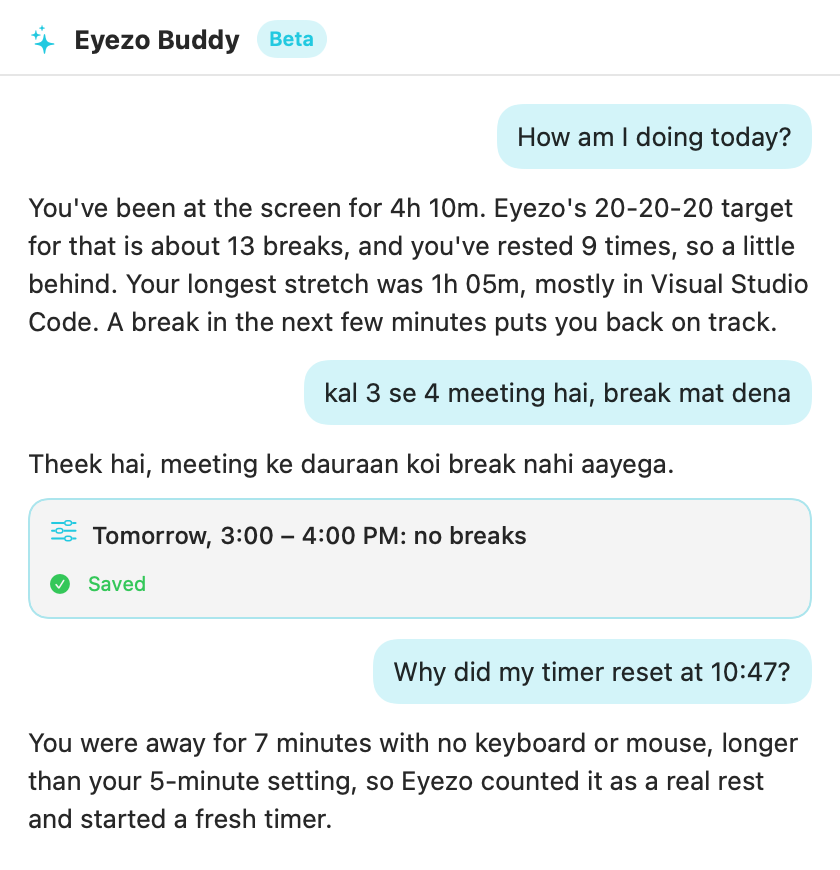
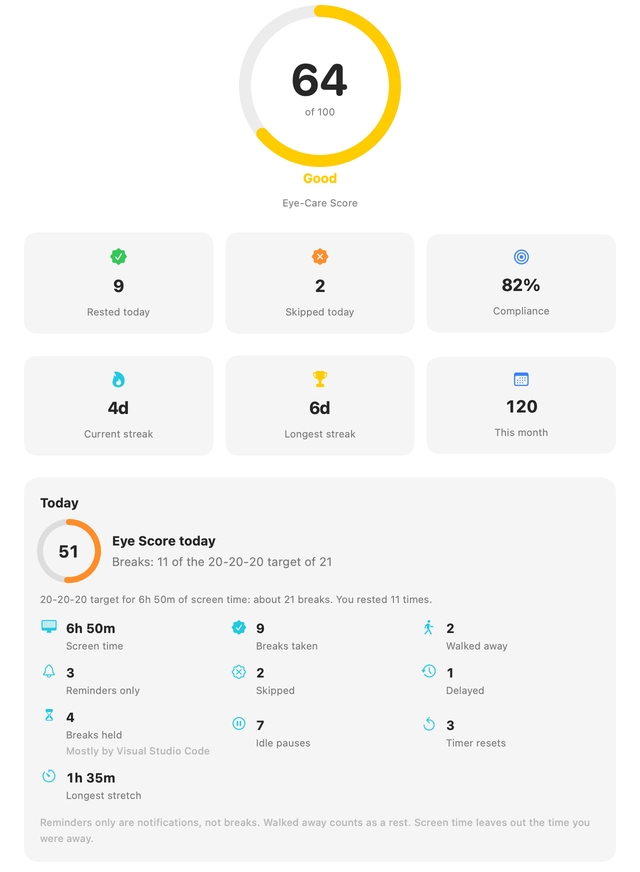
Screens from the Mac app, with sample data.
Also: it asks when it is not sure, it never changes anything without your Save, and if you ask for something Eyezo cannot do yet, it offers to pass the idea to our team. On a computer, click any example to try it in the live demo above.
Breaks, skips, screen time and your Eye Score are worked out on your device. Buddy only puts them into words, so it never has to guess a number.
Buddy suggests, you decide. Every change arrives as a small card with Save and Cancel, so a misunderstanding never changes your settings.
Buddy gets your settings and day totals only when you send a message. Never your screen, files or what you type elsewhere. We do not keep your chats. Privacy details
Eyezo starts a fresh timer when you have really rested: you walked away, locked the screen or closed the lid. Click any moment of this sample day to see how Buddy explains it.
Eyezo counts every break, skip and long stretch at the screen. Buddy turns those numbers into answers whenever you ask, and suggests what to change.
Pick an app and how long you want to spend in it. When the time is up, Eyezo dims the screen and asks you to stop. You stay in charge: leave, take 5 more minutes, or ignore it for today.
On a computer, Instagram and YouTube are usually websites. Limits for websites are on our roadmap.
You used it for 30 min today. Your limit is 30 min.
You set this limit for a reason. Small steps count.A break in the middle of a call or a sentence is a break you switch off for good. Eyezo holds it and brings it as soon as you are free.
Buddy is the new part. Underneath is a careful break timer that has been tuned for real working days.
A heads-up, then a short rest over any app. Choose a full break screen, a gentle message, or an “Ask me” button.
A full break in one app, only a message in another, nothing at all during a game or a meeting app.
Dims everything behind the window you are working in, so your eyes settle on one thing.
Mac and WindowsToday's score with the reason, breaks taken and skipped, your longest stretch, and a 7-day view.
Small reminders between breaks that never need a click.
Breaks only during working hours, and none during a meeting you add once.
English, Hindi, Spanish, Arabic, Japanese and more. Buddy answers in the language you write in.
No ads, no tracking, no analytics. Your break history stays on your device.
Windows and Mac are built for long working days at a desk. The Android app covers your phone, with eye exercises and parental controls.
| Windows | Mac | Android | |
|---|---|---|---|
| Break reminders over any app | ✓ | ✓ | ✓ |
| Eyezo Buddy (AI, beta) | ✓ | ✓ | Later |
| Breaks that wait for calls and videos | ✓ | ✓ | – |
| App time limits | ✓ | ✓ | ✓ |
| Glare Guard | ✓ | ✓ | – |
| Eye Score | ✓ | ✓ | ✓ |
| Eye exercises and parental controls | – | – | ✓ |
| Where to get it | Microsoft Store | TestFlight beta | Google Play |
Prices for Windows and Mac. The store shows them in your own currency.
Forever, no account needed
7 days free, then monthly. Cancel any time.
About $1.25 a month. Save 37% compared with monthly.
The 7-day trial needs no payment. When it ends, Eyezo goes back to the free plan unless you choose a plan. Prices are for Windows and Mac; the store shows them in your currency. Android has its own plans in Google Play.
What is done, where we are now, and what comes next.
Break reminders that wait for the right moment, so people stop switching them off.
Break reminders over any app, eye exercises, Eye Score and parental controls.
Windows in the Microsoft Store, the Mac in an open beta on TestFlight. Breaks that wait for calls, videos and typing, Glare Guard, 17 languages.
The AI assistant on Mac and Windows, with Screen Guard app limits, the Eye Score and a weekly report.
Getting reviews from beta users and making Buddy better every week. Tell us what you want.
Voice, so you can say what you want instead of typing it.
Screen Guard for sites like YouTube and Instagram, inside your browser.
The Mac app moves from the TestFlight beta to the Mac App Store.
A small character in the corner of your screen that notices when a day is going badly.
Including a short weekly note for parents, written by Buddy from a child's break counts.
Most break reminders pop up in the middle of a meeting, a game or a sentence, so people switch them off. Eyezo was started to fix that. Planning began in December 2025, and the apps came out in 2026: Android first, then Windows and the Mac. Founded by Shanu Tyagi.
Buddy is part of Premium and of the 7-day free trial. While it is in beta, there is a daily limit on messages.
Yes, it is your choice. Turn Buddy on or off any time in Settings › General. Eyezo works fully either way. We do not keep your chats.
Your message, your Eyezo settings and app rules (app names only) and your day totals, such as breaks taken and skipped. Only when you send a message. Never your screen, files, window titles or audio. Your chats are not saved on our server.
No. Eyezo helps you take regular breaks from the screen. It is not a medical device. If your eyes hurt, stay red or your vision changes, please see an eye doctor.
Any of the 17 languages the apps use, and mixes like Hinglish. Buddy answers in the language you write in.
Free to start. Takes a minute to set up.
 Eyezo · break
Find something about 20 feet (6 metres) away, out of a window if you can, and let your eyes relax on it.